Smart Home: Electric Standing Desk Analysis of Technology, and Trends

What Is an Electric Standing Desk (and Why the Tech Matters)?
An Electric Standing Desk is a desk that uses a motorized lifting mechanism to change your working height at the touch of a button. The technology is practical: a controller receives commands (up/down, presets), powers the lift through the lifting column system (or actuator-style mechanism), and monitors for safe operation—often including an anti-collision system desk to reduce pinch-and-crush scenarios.
In plain terms: you’re not buying a gadget; you’re buying a system that needs to feel stable, move smoothly, support your monitor/keyboard load safely, and let you change positions without breaking your workflow.

Quick definition (featured-snippet ready)
An electric standing desk is an adjustable-height desk powered by electric motors and controlled by a controller, typically featuring height presets and safety features to prevent accidental obstruction during lifting.
How does an electric standing desk work? (step-by-step)
You select a setting (manual up/down or a memory preset standing desk button).
The electric desk controller converts your command into power for the lift system.
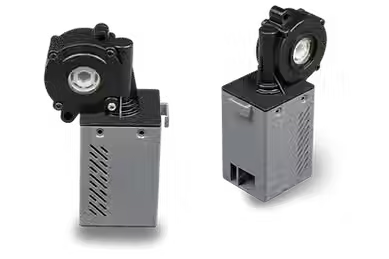
The motor(s) drive the lifting column system (commonly via internal mechanisms) to raise or lower the desktop.
If equipped, the anti-collision system desk detects resistance/obstruction and stops (and sometimes reverses) to reduce damage or injury.
The desk stops at the target height and maintains position until you command another move.
Under the Hood: The Technology You’re Actually Buying
The standing desk frame and lifting column system
Most electric desks rely on a standing desk frame with two sides that move together. The key component is the lifting column system, which turns motor power into vertical motion while keeping the desktop level.
What to pay attention to:
Consistency: Both sides should move in sync to keep the top from “leaning.”
Rigidity: A strong frame reduces wobble when typing or adjusting posture.
Cable routing clearance: Modern workspace design now expects clean cable management—good frames make this easier.
Linear actuator desk vs lifting columns (what the terminology usually means)
You may see linear actuator desk in product listings. In many cases, marketing uses these terms to describe the same general outcome: controlled straight-line lifting.
What’s important for buyers is not the label—it’s:
Smooth travel (no jerky movement)
Stable end-stop behavior
Predictable height calibration
Longevity under your typical load and usage pattern
If a listing is vague, prioritize detailed specs and clear component descriptions (or contact support).
Electric desk controller: signals, presets, and safety logic
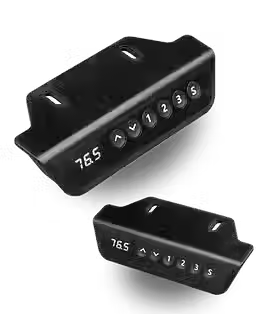
The electric desk controller is the “brain” you interact with—whether that’s a simple control panel or a more advanced interface.
Common controller functions:
Up/down control with limit stops
Memory preset standing desk positions (often multiple)
Anti-collision behavior (stop on obstruction; sometimes retry logic)
Handset responsiveness (latency and button feel matter more than people expect)
Editorial tip: If you plan to change heights frequently, choose a desk where the preset buttons are easy to reach and the controller is intuitive. You’ll use it every day.
Motor choice: single motor desk vs dual motor standing desk
This is one of the most practical decisions.
Single motor desk
Typically simpler design
Can be sufficient for smaller tops or lighter loads
May have fewer moving parts, depending on model
Dual motor standing desk
Uses two motors (often one per side)
Generally improves synchronization and leveling for wider or heavier desktops
Often feels more stable during typing and monitor adjustments
How to decide:
If you’re using a larger tabletop, heavy monitor arm(s), or want a “set-and-forget” feel at many heights, dual motor designs are often the safer stability bet.
If your setup is modest and you’re budget-conscious, a good single motor model can still be a strong ergonomic improvement.
Height range and travel speed: usability details
When reviewing desk height range, think in terms of fit, not only maximum and minimum numbers.
Ask:
Can you reach a position where your elbows are roughly aligned for comfortable typing?
Can you stand without your shoulders creeping up?
Will you still feel comfortable with your monitor at the right level (you may need a monitor arm)?
Travel speed also affects real experience:
Too slow can disrupt workflow.
Too fast can feel abrupt (and can increase stress on components).
Good desks balance smooth motion with safe stopping behavior.

Safety and Reliability Features to Look For
Anti-collision system desk: how it reduces risk
An anti-collision system desk aims to prevent harm when something blocks the lift path. While the exact method differs, the core idea is consistent: the desk detects unusual resistance during movement and stops (and may reverse or require a reset depending on design).
Look for product descriptions that clearly explain:
What the system does during obstruction
Whether it simply stops or also retracts
How it behaves after obstruction (does it resume? do you need to press again?)
Even with safeguards, you should still keep lift paths clear—especially around pets, storage bins, or cable bundles.
Weight capacity standing desk: why stability matters more than max specs
The weight capacity standing desk number is useful, but it’s not the whole story.
Consider:
Load distribution: A heavy monitor arm mounted off-center can create torque.
Dynamic behavior: Typing and leaning add short bursts of force.
Top material and thickness: A flimsy top can flex even if the frame is rated well.
Practical rule: Stay under the stated max load, and be conservative if you use multiple monitors, a heavy keyboard tray, or accessories that create leverage.
Noise, smoothness, and long-term maintenance
Electric desks are mechanical systems. The best ones:
Move smoothly without grinding or “catching”
Keep a stable feel over repeated cycles
Maintain performance without frequent recalibration
Maintenance basics (generally applicable):
Keep the lift track area clean of dust and debris
Avoid impacts (don’t slam drawers or storage into the frame)
Ensure cables don’t bind during motion
If you’re shopping smart-home style, also consider how often you’ll use presets—frequent repositioning increases the value of a desk that feels consistently smooth.

Smart Home Furniture Trends
“Smart home furniture” can sound like marketing. In practice, the most useful trends are about better habits and easier control, not complicated ecosystems.
Automation in furniture: presets, patterns, and “set-and-go” habits
The most common automation is still human-centered:
Memory presets let you return to a comfortable height instantly.
Some controllers support more advanced behaviors (varies by brand), like cycling between heights on demand.
The real improvement is that you spend less time adjusting and more time working—supporting a movement habit without thinking about it.
Smart connectivity: what “integrates” usually means in practice
Some electric desks add connectivity options (app control, Bluetooth, Wi‑Fi, or compatibility with broader home automation systems).
Here’s the grounded way to interpret “integration”:
If you can control height from a phone, that’s a convenience feature.
If you can tie desk movement to schedules, that’s helpful for routine building.
If it connects to other systems, the value depends on whether the setup is stable, responsive, and easy to manage long-term.
Because ecosystems differ, prioritize:
Clear product documentation
Controller reliability over time
Options that don’t lock you into complicated configurations
Sensor-forward designs: collision detection + smarter stopping behavior
Trend direction: more intelligent safety detection and smoother stopping. Buyers should still treat these as safeguards—not permission to ignore clearance.
If a desk offers an anti-collision system desk, look for:
Consistent behavior during light obstruction (not overly sensitive)
Predictable stopping near the end of travel
Easy recovery after an obstruction
Power management, cable control, and modern workspace design
Modern desks are increasingly designed around real home-office constraints:
Cable trays or management channels that reduce drag during lifts
Improved cord routing to prevent snagging
Power handling that supports everyday use safely
This matters because cable chaos is a common reason people stop adjusting heights. A desk that keeps cables tidy makes it easier to use the standing function regularly.
Buying Guide: How to Choose the Best Electric Standing Desk for Your Home Office
Step 1 — Fit: desk height range + your workstation layout
Start with your workflow:
Are you mostly on a laptop or desktop with external monitor(s)?
Do you plan to use a monitor arm?
What chair height and typing posture are you currently using?
Then verify whether the desk height range supports both:
A comfortable seated typing position
A comfortable standing keyboard/mouse position
If the range is tight, you might end up using only a narrow band of heights—reducing the real ergonomic benefit.
Step 2 — Load: electric standing desk weight limit and real-world stability
Count your setup:
Desktop top and thickness
Monitor(s) weight (especially with arms)
Keyboard tray (if used)
Accessories like speaker stands or heavy docking stations
Then pick a desk with a reasonable margin below max ratings. Stability is often determined by how the frame handles real torque and off-center loads.
Step 3 — Lift mechanics: lifting column vs linear actuator style
Use this as a “feel and function” filter:
Does it move smoothly at low and high heights?
Does it level correctly across the range?
Does it stop cleanly without bouncing?
If the product description is vague, look for detailed spec pages or clear support documentation.
Step 4 — Controls: memory preset standing desk and ease of use
Choose based on your actual behavior:
If you alternate between two heights, look for at least two reliable presets.
If multiple people or roles share the desk, consider more presets.
Ensure the controller is simple and reachable without stretching.
A great controller reduces friction—which increases the odds you’ll use the desk as intended.
Step 5 — Frame selection: how to choose a standing desk frame
A strong frame should deliver:
Consistent leveling (no tilt as it moves)
Reduced wobble under typing pressure
Proper clearance for cable management
A design that matches your tabletop width and depth
When comparing options, don’t just look at “max height” or “max load.” Frame stiffness is what you feel every day.
Step 6 — Special cases: standing desk for small spaces and tight corners
For standing desk for small spaces, the buying risks are:
Limited clearance for lift
Poor cable routing (binding or visible clutter)
A tabletop size that makes monitor and keyboard ergonomics difficult
Smart approach:
Prefer desks with predictable height travel and good cable routing.
Plan the workstation footprint so you don’t bump the lift path with drawers or nearby furniture.
Consider a monitor arm to free up desktop space.
Electric Standing Desk vs Manual Desk: Decision Criteria
An electric standing desk vs manual desk choice usually comes down to effort and frequency.
Electric desks generally win when:
You’ll change heights often during the day
You want effortless preset switching
You have heavier loads (monitor arms, larger tops)
Manual desks can be attractive when:
Your budget is tighter
You prefer fewer moving parts
You don’t plan on frequent height changes
However, the hidden factor is adherence. If using the desk is inconvenient, people stop adjusting. If convenience helps you actually move more, the electric model often pays off quickly.
Are Standing Desks Worth It?
Standing desks are not a magic solution, but they can be a powerful productivity and comfort tool when used correctly.
Worth it if you:
Alternate between sitting and standing (movement as a habit)
Set up your monitor and keyboard positioning to reduce strain
Use the desk consistently enough that it becomes part of your workflow
Not worth it if you:
Expect the desk alone to resolve posture issues without changing chair, screen position, or habits
Choose a desk with a poor fit (you’ll compensate with shoulders/neck posture)
Ignore stability and end up uncomfortable during typing
The best way to think about it: a standing desk helps you vary your posture and reduce the monotony of sitting, which supports longer work sessions for many people.
Electric Standing Desk for Back Pain: What to expect (and what not to assume)
If you’re searching electric standing desk for back pain, it’s important to set realistic expectations.
A motorized desk can help because it allows easier position changes—often beneficial for people who feel stiffness after long sitting. But:
Back pain is multifactorial (core strength, movement habits, workstation ergonomics, medical history).
A desk that moves doesn’t automatically ensure good posture.
What to do for posture support:
Set monitor height so your neck stays neutral (avoid constant looking down).
Use appropriate keyboard/mouse positioning to prevent shoulder elevation.
Consider gradual transitions: don’t jump from “all sit” to “all stand” immediately.
If you have ongoing pain, consult a qualified clinician.
In short: the desk can support a better movement routine, but it’s one part of a holistic ergonomic approach.
FAQ
1) What is an electric standing desk?
An electric standing desk is an adjustable-height desk powered by electric motors and controlled by an electric desk controller. It typically includes height presets and safety behaviors such as an anti-collision system to prevent damage during lifting.
2) How does an electric standing desk work?
You press a button or select a preset. The controller powers the motor(s), which move the lifting column system to raise or lower the desktop to a target height, stopping safely at limits and sometimes using obstruction detection.
3) Electric standing desk vs manual desk—what’s the main difference?
The main difference is effort and speed: electric desks lift automatically, making frequent position changes easier. Manual desks require physical effort and usually are less convenient for rapid switching.
4) Single motor desk or dual motor standing desk—what should I choose?
Choose dual motor standing desk if you want improved symmetry/stability for larger or heavier setups. Choose single motor desk if your footprint and load are modest and you want a simpler, often more budget-friendly system.
5) What is the electric standing desk weight limit?
It’s the maximum load the manufacturer recommends for safe operation. For real-world stability, consider not only the weight but also how your accessories create torque (like monitor arms) and choose a comfortable margin below max ratings.
6) Does an anti-collision system desk really help?
It’s designed to stop the desk when it detects an obstruction during movement. It reduces risk, but you should still keep the lift path clear and avoid letting cables or objects bind near moving parts.



Comments