Standing Desk Error Codes Explained: What They Mean and How to Fix Them
A standing desk error code usually means the desk’s control system has detected one of a few common problems: a reset is needed, the desk is overloaded, a motor is out of sync, a cable is loose, or the control box is not communicating correctly. In many cases, the fix is straightforward—power-cycle the desk, check the wiring, remove extra weight, and run the reset procedure. The key is not to treat every code as a unique mystery. Most of them point back to the same small group of root causes.
If your standing desk suddenly stops moving, flashes a strange code, or only travels in one direction, this guide will help you understand what is happening and what to do next.
Why standing desk error codes happen
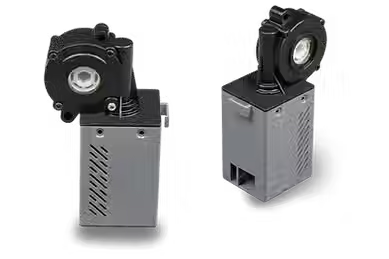
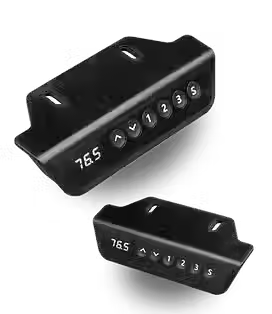
Standing desks rely on a small electronic system working in sync: a power supply, a control box, a handset or keypad, one or more motors, and often anti-collision or position sensors. When one part stops communicating properly or detects unsafe movement, the system throws an error.
That is why a code on the display is less about the code itself and more about what category of problem the desk is trying to report. In practical terms, most errors happen after one of these events:
the desk loses power unexpectedly
a cable becomes loose during use or assembly
the desktop is overloaded
one leg travels unevenly
the desk hits an obstruction
the control system loses its stored position and needs reinitialization

The short answer: what most standing desk error codes actually mean
Across many standing desks, error codes generally fall into five categories:
Reset or initialization errors mean the desk has lost its position reference and needs a manual reset.
Overload or obstruction errors mean the desk senses too much resistance, too much weight, or a collision.
Motor mismatch errors mean one leg is moving differently from the other, or the motors are out of sync.
Communication errors mean the handset, control box, or motor wiring is not connected properly.
Sensor or internal faults mean the desk may have a defective part, a stuck anti-collision system, or a failed electronic component.
That framework is more useful than memorizing random letters and numbers, especially because exact code meanings vary by manufacturer and control system.

Common standing desk error codes and what they usually indicate
Not every standing desk uses the same codes. One brand’s “E1” may not match another brand’s “E1.” Still, many desks group faults in similar ways. The most helpful way to read them is by function, not by assuming a universal code chart applies to every model.
Reset or initialization errors
These appear when the desk loses track of its lowest or highest position. This often happens after a power interruption, first-time assembly, or manual unplugging.
What it usually means: The desk needs to be reinitialized so the control box can relearn its travel range.
What to do: Hold the down button until the desk reaches its lowest point, then keep holding for several seconds. On some models, a dedicated reset button or key combination is required. If your desk manual has a model-specific reset method, use that first.
Overload and obstruction errors
These happen when the desk senses resistance beyond what it expects.
What it usually means: The desk may be carrying too much weight, hitting an object, dragging against a wall, or binding during movement.
What to do: Remove extra equipment, especially heavy monitors, desktop converters, mounted accessories, or storage items underneath. Check that nothing is blocking movement. Then try again.
Motor mismatch or synchronization errors
On dual-motor or multi-leg desks, both sides must move in sync. If one leg lags, stalls, or travels farther than the other, the controller may stop the desk and show an error.
What it usually means: A motor is not responding correctly, one side is mechanically binding, or the system needs to resynchronize.
What to do: Run a reset. Then watch whether both legs move evenly. If one side hesitates, makes unusual noise, or stops early, the problem may go beyond software and point to wiring, motor performance, or frame alignment.
Control box or handset communication errors
These can look dramatic but are often caused by something simple.
What it usually means: The keypad is not talking to the control box, a motor cable is in the wrong port, or a connector is partly unplugged.
What to do:Power off the desk completely. Reseat every connector firmly. Check that the handset cable and motor cables are in the correct labeled ports. A connection that is almost seated can still cause intermittent faults.
Sensor and anti-collision errors
Many standing desks include anti-collision functions that stop movement when resistance is detected. If the system becomes too sensitive or misreads movement, it may halt the desk.
What it usually means:The desk believes it has encountered an obstruction, or a sensor is giving incorrect feedback.
What to do: Clear the travel path above and below the desk. Make sure the frame is level and not twisting under uneven load. Then perform a reset. If the desk keeps stopping without any obstruction, the sensor or control system may need service.
Featured snippet: how to fix a standing desk error code
How do you fix a standing desk error code?
Unplug the desk for 30 to 60 seconds.
Check every cable between the power supply, control box, motors, and keypad.
Remove excess weight and clear any obstruction.
Plug the desk back in and perform the reset procedure.
Test whether both legs move evenly.
If the error returns, identify whether the fault is with the handset, control box, motor, or frame—and contact support if needed.
Step-by-step troubleshooting checklist
When a standing desk shows an error, the best approach is systematic. Do the simple, high-probability fixes first.
1. Power-cycle the desk
Unplug the desk from the wall. Wait at least 30 seconds. This allows the control system to fully shut down. Plug it back in and test it again.
Why this matters: temporary control glitches can clear after a full power cycle, especially after a surge or interruption.
2. Check all cable connections
Inspect every visible connection:
power cable to outlet
power supply to control box
handset to control box
motor leads to control box
Do not just glance at them. Unplug and firmly reconnect them. A loose connector is one of the most common causes of a standing desk error.
3. Remove excess weight
A desk can operate below its advertised capacity in real life if the load is distributed poorly or if one side carries more weight than the other.
Remove:
extra monitors
desktop shelves
under-desk accessories
heavy storage items
anything hanging from one side of the frame
Then test movement again.
4. Perform a reset
Most standing desks have a reset or initialization sequence. The common pattern is to move the desk to its lowest position and continue holding the down button until the display changes or the desk briefly rebounds.
General rule: if your desk manual gives a specific reset method, follow that method instead of a generic one.
5. Inspect leg movement and alignment
If the desk begins moving but looks uneven, stop using it immediately. A desk that is twisting or racking can create repeat errors and increase wear.
Look for:
one leg moving before the other
unusual clicking or grinding
frame tension after assembly
uneven floor contact
bolts that are over-tightened on one side and loose on the other
This is where many “electronic” error codes turn out to be mechanical issues.
6. Test the handset and control box
If the display is dead, flickering, or unresponsive, the problem may be the handset or the control box rather than the motors.
A few clues:
Display works, but no movement: likely communication or motor issue
No display at all: power supply, control box, or handset issue
Moves only up or only down: often reset-related, sensor-related, or a control fault
Moves briefly, then stops: overload, sync, or anti-collision issue
If you have access to model-specific support instructions, this is the stage where they become useful.
When a reset solves the problem—and when it will not
A reset is the right answer when the desk has lost its positional memory or needs reinitialization. It is often effective after assembly, after the desk has been unplugged, or after a minor power event.
A reset is usually not enough when:
a cable is damaged
a motor is failing
one leg is binding mechanically
the control box is defective
the desk repeatedly throws the same code under light, normal use
That distinction matters. Many users get stuck repeating resets when the real issue is a part that is not functioning properly.
Signs the issue is mechanical, not electronic
It is easy to assume every error code is a software or electronics problem. Often, it is not.
Your issue may be mechanical if:
the desk frame visibly twists during movement
one side sits higher than the other
movement is noisy or jerky
the desk stops at the same height every time
bolts loosen repeatedly
the desk struggles only under real working load, not when empty
These symptoms suggest friction, imbalance, or alignment problems that a reset alone will not fix.
When to stop troubleshooting and contact support
You should stop DIY troubleshooting and contact the manufacturer or seller when:
the desk still shows the same error after a full reset
one motor does not respond at all
the desk moves unevenly or appears unsafe
cables or ports look damaged
the control box smells hot or shows visible damage
the desk works only intermittently
At that point, the best next step is usually a model-specific diagnosis or a replacement component. General troubleshooting is useful, but repeated trial-and-error on a powered lifting system can waste time and increase risk.
How to prevent standing desk errors in the future
Most recurring errors are preventable with a few habits.
Keep the load balanced. Heavy items should not all sit on one side.
Avoid dragging cords, monitor arms, or wall-mounted accessories into the desk’s travel path.
Retighten hardware periodically. A frame that loosens over time can introduce misalignment and resistance.
Do not exceed rated capacity. Even when the desk still moves, extra load can strain the motors and controller.
Use a surge protector if power quality is inconsistent. Sudden interruptions can trigger control issues or force resets.
And if you ever move the desk, disconnect and reconnect cables carefully rather than yanking or twisting connectors into place.
Final thoughts
Standing desk error codes feel technical, but the underlying logic is usually simple. Your desk is telling you one of five things: it needs a reset, it senses too much resistance, its motors are not moving together, its components are not communicating properly, or a part may be failing.
That is good news for most users, because it means you can troubleshoot calmly and methodically instead of guessing. Start with power, wiring, weight, and reset. Then look for uneven movement or hardware issues. If the same error keeps returning, treat it as a sign to escalate rather than a signal to keep forcing the desk to run.
If you are comparing new desks, it is worth choosing a model with a stable frame, clear support documentation, and responsive service. Good design does not just improve comfort—it makes troubleshooting easier when something goes wrong.
FAQ
1. What is the most common standing desk error?
The most common standing desk error is a reset or initialization issue after power loss, setup, or interrupted movement. In many cases, holding the down button to complete a reset solves it.
2. Why is my standing desk stuck and showing an error code?
A desk that is stuck with an error code is usually dealing with one of four issues: overload, obstruction, motor sync failure, or a communication problem between the control box and keypad.
3. Can I fix a standing desk error code myself?
Often, yes. Many standing desk errors can be fixed by unplugging the desk, checking all connections, removing extra weight, and running the reset procedure. Persistent or repeat faults may need manufacturer support.
4. Why does my standing desk only go down and not up?
This often points to a reset requirement, an anti-collision issue, or a problem with the control system. It can also happen if the desk has not completed its initialization cycle.
5. Do standing desk error codes mean the motor is broken?
Not always. Error codes often reflect temporary control or setup problems rather than a failed motor. But if one leg does not move, makes abnormal noise, or repeatedly falls out of sync, motor or hardware failure becomes more likely.
6. Are standing desk error codes the same across all brands?
No. Exact code definitions vary by manufacturer and control box. That is why the most useful approach is to group errors by type—reset, overload, sync, communication, or sensor fault—rather than assume one universal code chart applies to every desk.

Comments