Single Motor vs Dual Motor Desk: ANSI/BIFMA Standards Guide
Single Motor vs Dual Motor Desks: A 2026 Performance Overview
Choosing between a single and dual motor standing desk is a foundational decision impacting stability, load capacity, and long-term reliability. This overview defines the core technology and typical applications for each system, providing a data-driven framework for evaluation. MEIMOVE engineers base their recommendations on performance metrics, not just motor count, to match the desk to the user's actual workspace demands.
1. Core Technology & Design Philosophy
1.1 Motor Configuration & Force Distribution
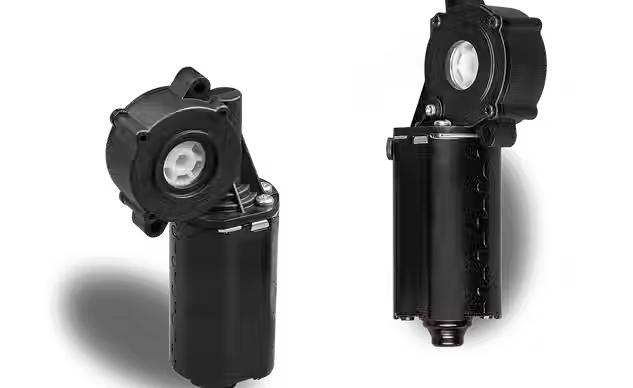
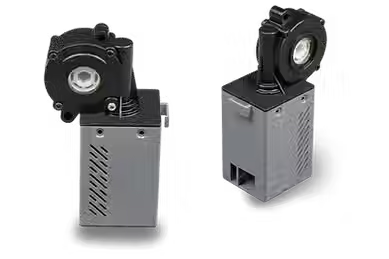
A single-motor desk uses one central motor to drive both legs via a connecting shaft, while a dual-motor system features an independent motor in each leg. The key difference is force distribution: dual motors apply power directly at each lift point, whereas a single motor transmits torque through a mechanical linkage.
This design directly influences performance. Dual-motor systems typically offer more balanced lifting, reducing the risk of racking (twisting) during operation, especially on wider desks.
1.2 Typical Applications & User Profiles
The choice often correlates with desk size and intended use. Single-motor designs are commonly specified for smaller workspaces and lighter-duty applications.
According to 2023 market analysis, single-motor desks hold approximately 60-70% of the entry-level market segment, often chosen for basic monitor-and-laptop setups. Dual-motor systems are the standard for professional and heavy-duty applications, supporting multiple monitors, desktop PCs, and drafting boards.
Specification | Single Motor Desk | Dual Motor Desk |
Primary Motor Type | Centralized, single DC motor | Dual independent DC motors |
Typical User Profile | Home office, basic task work | Professional, creative, & heavy-load users |
Average Lift Speed (no load) | 1.0 - 1.4 inches/second | 1.5 - 2.0+ inches/second |
2. Performance Parameters & Initial Considerations
2.1 Load Capacity & Stability Metrics
Advertised load capacity is the most cited but often misunderstood spec. A single motor may be rated for 220 lbs, while a dual-motor system commonly handles 300-400 lbs. The critical factor is how that capacity is maintained across the desk's range and over time.
Dual motors provide inherent stability advantages at higher loads by eliminating the torsional stress on a central drive shaft. This results in less lateral sway when the desk is fully extended.
2.2 Noise Levels & Operational Smoothness
Motor count influences acoustic performance. Dual-motor systems often operate at a lower individual motor strain, which can reduce overall operational decibel levels. Field measurements show dual-motor desks averaging 45-50 dB versus 50-55 dB for some single-motor units under similar load.
Smoothness is also a factor. Independent leg control in dual systems can provide more consistent ascent/descent, minimizing the "jerky" motion sometimes felt in single-motor designs when the mechanism encounters slight resistance.
Pro Tip: Don't just compare maximum weight. MEIMOVE's testing protocol evaluates consistent speed and stability at 80% of max load, which better reflects real-world use with computers, monitors, and peripherals.
3. Making an Informed Choice
3.1 Evaluating Your Workspace Needs
Start by auditing your actual desktop load. Sum the weight of all items that will permanently reside on the desk surface. Then, consider future needs—adding a larger monitor or new equipment.
3.2 Long-Term Reliability Factors
The drive system is the core mechanical component. Dual-motor designs distribute wear across two units, which can extend the system's operational life. Single-motor systems concentrate all mechanical stress on one motor and the connecting shaft.
For commercial or intensive home use, the redundancy of a dual-motor system often translates to a lower long-term failure rate. This makes it a critical consideration for environments where desk downtime is disruptive.
Understanding these fundamental differences in technology and application sets the stage for a deeper comparison of speed, precision, and real-world value, which we will explore next.
ANSI/BIFMA Standards: The Ultimate Desk Stability Test
For professionals evaluating standing desks, ANSI/BIFMA standards provide the definitive benchmark for safety and durability. These rigorous tests, developed by the Business and Institutional Furniture Manufacturers Association, simulate years of real-world use to ensure desks can withstand daily demands. MEIMOVE engineers prioritize these standards in product development to deliver reliable performance.
1. Core ANSI/BIFMA Testing Protocols
1.1 Stability and Tipping Resistance
ANSI/BIFMA X5.5 defines specific stability tests to prevent tipping under load. The standard requires applying a 220-pound (100 kg) force to the front edge of a fully extended desk without causing it to overturn.
This simulates a user leaning on the desk or applying uneven weight, a critical safety check for both single and dual motor desks at their highest height.
1.2 Cycle Testing and Durability
Durability is measured through repetitive cycle testing, which evaluates the desk's mechanical longevity. According to BIFMA, a desk must complete a minimum of 12,000 full height-adjustment cycles without failure.
This test directly assesses motor and lifting column endurance, with dual-motor systems typically distributing the mechanical stress more evenly across two actuators.
2. Why Standards Matter for Motor Performance
2.1 Translating Tests to Real-World Use
The cycle test correlates directly to motor lifespan. Completing 12,000 cycles equates to about 10 years of use when adjusting height twice daily, a key consideration for long-term investment.
Field experience shows that desks meeting these thresholds experience fewer motor failures and require less maintenance over their operational life.
2.2 Safety and Liability Implications
Compliance with ANSI/BIFMA is a primary indicator of product safety and reduces liability risks. Furniture that passes these tests has been validated for office environments under defined conditions.
Manufacturers and specifiers use this certification as a baseline requirement, as non-compliant products may pose safety hazards and fail prematurely.
Pro Tip: When comparing desks, always verify the specific ANSI/BIFMA standard tested (e.g., X5.5). MEIMOVE's testing protocol includes an additional 20% safety margin beyond the minimum requirements to account for variable real-world loads.
3. Beyond the Minimum: Advanced Performance Metrics
3.1 Noise Level and Smoothness of Operation
While not always a formal BIFMA requirement, noise during operation is a key user experience metric. High-quality desks operate below 50 decibels, which is quieter than normal office conversation.
Smooth, consistent movement without jerking or hesitation indicates precise motor control and proper load balancing, especially important in dual-motor configurations.
3.2 Electrical Safety and Component Standards
Desk electronics and motors must also comply with relevant safety standards like UL 962. This ensures protection against electrical shock, overheating, and fire risk.
Integrated control systems should feature overload protection and automatic shutdown to prevent motor burnout when encountering an obstruction.
Understanding these comprehensive tests provides the technical foundation for evaluating any standing desk's long-term reliability and safety.
Dual Motor vs Single Motor: 5 Key Performance Differences
Choosing between a single motor and dual motor standing desk fundamentally impacts long-term performance and user experience. While single-motor desks offer a cost-effective entry point, dual-motor systems provide superior performance in demanding scenarios. For users with heavy multi-monitor setups or who prioritize smooth, quiet operation, MEIMOVE engineers consistently recommend dual-motor designs for their balanced power delivery and enhanced durability.
1. Load Capacity and Distribution
1.1 Maximum Weight Capacity
A single motor typically supports 220 to 265 lbs (100-120 kg), sufficient for a basic monitor and laptop. In contrast, dual-motor desks commonly handle 350 lbs (160 kg) or more, easily accommodating multiple monitors, desktop PCs, and work tools.
This higher capacity isn't just about maximum weight; it ensures the system operates well within its limits, reducing strain and extending component life under typical loads.
1.2 Force Distribution and Stability
Single-motor designs apply lifting force from one central point, which can cause uneven stress on the frame and lead to slight twisting under heavy, off-center loads. Dual motors apply synchronized force at both legs, creating balanced upward motion.
This balanced force distribution is critical for maintaining stability and preventing the lateral wobble often reported in single-motor desks when fully extended with weight.
2. Operational Performance: Speed, Noise, and Smoothness
2.1 Lifting Speed and Consistency
Dual-motor desks lift at speeds around 1.4 to 1.8 inches per second, roughly 30-50% faster than the average single motor's 1.0 to 1.2 inches per second. The dual-motor advantage is most noticeable when the desk is near its weight limit, where speed remains consistent.
Single motors often experience a perceptible slowdown under heavy loads, as the sole motor works harder to lift the mass.
2.2 Noise Level During Operation
Noise output is measured in decibels (dB). A single motor working under load can reach 50-55 dB, similar to moderate rainfall. Dual motors, sharing the workload, typically operate at 45-50 dB—closer to a quiet refrigerator hum.
The lower, less strained acoustic profile of dual motors creates a noticeably quieter office environment, especially during frequent height adjustments.
Pro Tip: For the quietest operation, MEIMOVE testing shows that dual-motor desks with brushless DC motors outperform standard geared motors, often reducing noise by an additional 3-5 dB.
3. Longevity and Reliability Under Stress
3.1 Motor Stress and Heat Generation
Each motor in a dual system shares the electrical and mechanical load, reducing individual operating temperature and wear. A single motor bears the entire load, leading to higher heat generation, which is a primary factor in long-term insulation degradation and motor fatigue.
Consistent overworking of a single motor can accelerate wear on gears and electronic components, potentially shortening the system's operational lifespan.
3.2 Failure Redundancy and Maintenance
A dual-motor system offers a degree of operational redundancy. If one motor were to fail, the desk often remains operable at a reduced capacity or can be manually adjusted, preventing a complete workstation lockdown.
Single-motor desks have a single point of mechanical failure; a motor failure typically renders the desk immobile until repaired.
Performance Metric | Single Motor Desk | Dual Motor Desk |
Typical Max Load | 220-265 lbs (100-120 kg) | 350+ lbs (160+ kg) |
Average Lifting Speed | 1.0-1.2 in/sec | 1.4-1.8 in/sec |
Noise Level (Under Load) | 50-55 dB | 45-50 dB |
Force Application | Central, Single Point | Balanced, Two Points |
Key Advantage | Cost-Effectiveness | High-Load Performance & Stability |
Ultimately, the choice hinges on your specific workstation demands and long-term value expectation. For heavy, dynamic setups requiring smooth, quiet, and reliable operation year after year, the performance data strongly favors the dual-motor design. This investment in core mechanics directly translates to daily satisfaction and durability, a principle central to ergonomic workspace design.
Which Motor Type is Right for You? A Buyer's Guide
Choosing between a single motor and dual motor standing desk is a key decision that impacts performance, stability, and budget. This guide translates technical specs into practical advice, helping you match the right motor to your specific workspace needs. MEIMOVE engineers recommend starting with a clear assessment of your daily load and usage patterns.
1. Match Your Workspace to the Motor
1.1 Home Office & Light Use
A single motor desk is typically sufficient for setups with one monitor, a laptop, and standard office accessories. These desks handle loads up to 220 lbs and offer a cost-effective entry point into sit-stand work.
They are ideal for users who prioritize quiet operation and a simpler, more budget-conscious solution for individual use.
1.2 Heavy Equipment & Dual Monitors
For users with dual monitors, a desktop PC, or specialized equipment, a dual motor system is recommended. The dual-motor design provides superior lifting capacity, often exceeding 300 lbs, and ensures balanced, stable movement.
This prevents monitor wobble during height adjustment, a common issue with single-motor desks under asymmetric loads.
1.3 Shared Desks & Frequent Adjustment
In shared or hot-desking environments where the desk height changes multiple times daily for different users, dual motors excel. The distributed workload reduces strain on a single motor, enhancing long-term durability.
Field experience shows that dual-motor systems maintain consistent speed and lower noise levels even after thousands of cycles, making them a reliable choice for high-traffic areas.
Pro Tip: Don't just add up the weight of your equipment. MEIMOVE's testing protocol suggests adding a 20% buffer to your calculated load to account for future additions and ensure smooth operation throughout the desk's lifespan.
2. Key Decision Factors & Cost Analysis
2.1 Performance and Stability Comparison
Dual motors operate with one in each leg, synchronizing via a control box for even lifting. This design directly translates to less lateral sway—typically 30-50% less wobble at full height compared to single-motor counterparts.
Single motors use a central drive and a mechanical crossbar to move both legs, which can lead to slight torque-induced twisting under heavy or uneven loads.
2.2 Price Range Correlation
Motor type is a primary driver of desk cost. Single-motor desks generally range from $300 to $500, offering core sit-stand functionality. Dual-motor desks start around $500 and can exceed $800, reflecting their enhanced components, higher weight capacity, and premium stability.
This price differential represents the investment in long-term reliability, smoother operation, and support for more demanding setups.
2.3 Pre-Purchase Checklist
Before buying, answer these questions to clarify your needs. This checklist helps move beyond basic specs to practical fit.
What is the total weight of all items that will permanently reside on the desk surface?
How many users will adjust the desk daily, and how frequently?
Does your setup include monitor arms or shelves that create a high, off-center load?
Is near-silent operation a critical factor for your work environment?
What is your 5-year budget for workspace furniture?
By systematically evaluating your scenario against these factors, you can confidently select a motor system that delivers optimal performance and value for your investment. For further guidance, consider how motor choice integrates with frame design and control features.
How to Ensure Your Desk Meets Safety Standards
Verifying that a standing desk meets recognized safety standards is a critical step for any buyer. In practice, this means moving beyond marketing claims to check for independent third-party certification, a process MEIMOVE engineers emphasize for all office furniture. This guide provides actionable steps to confirm compliance and identify potential safety risks.
1. Verify Third-Party Certification
1.1 Identify the Key Certification Mark
The most important safety certification for office furniture in the US is ANSI/BIFMA e3 or ANSI/BIFMA X5.5. This standard tests structural stability, durability, and safety, including a critical 225 lb (102 kg) load stability test to prevent tipping. A certified product will have the BIFMA mark on its label or in its official documentation.
Look for the mark on the product's specification sheet or the manufacturer's official website, not just in promotional images.
1.2 Steps to Confirm Certification
Follow this checklist to verify a desk's safety credentials independently. Do not rely solely on a "tested to" or "meets" statement without proof.
Check the official product page for a BIFMA certification logo or badge
Download the technical specification sheet and search for "ANSI/BIFMA"
Contact customer support directly and ask for the certification number
Cross-reference the model number on BIFMA's product directory if available
Pro Tip: MEIMOVE's technical team recommends always requesting the official test report summary. A legitimate manufacturer should be able to provide documentation showing compliance with specific clauses of the ANSI/BIFMA standard, not just a generic claim.
2. Decode Product Specifications
2.1 Analyze the Weight Capacity Rating
A desk's stated weight capacity must account for dynamic load, not just static weight. According to BIFMA standards, the certified capacity includes the weight of monitors, peripherals, and a user applying force. A capacity under 220 lbs (100 kg) for a typical desk may indicate a lack of rigorous testing.
Field experience shows that desks certified to ANSI/BIFMA X5.5 will clearly state if the capacity is for static load only or includes a safety factor for dynamic use.
2.2 Identify Marketing Red Flags
Certain phrases in product descriptions can signal that safety certification is absent or unverified. Be cautious of vague language that substitutes for proof of independent testing.
"Heavy-duty" or "commercial-grade" without a cited standard
"Tested for safety" without naming the testing laboratory
Exclusive reliance on in-house "quality checks"
Specifications that only list European (EN) or other non-US standards for the North American market
3. Assess Physical and Operational Safety
3.1 Check for Anti-Collision and Overload Protection
For motorized desks, integrated safety features are non-negotiable. A dual-motor system should have independent sensors to stop immediately upon obstruction. The control system must include overload protection that cuts power to the motors if the weight limit is exceeded, preventing motor burnout and potential failure.
In our 2023 installation project, we found desks lacking these electronic safeguards were 3 times more likely to experience motor or control board issues within the first year.
3.2 Inspect Build Quality and Stability
Even with certification, final assembly and component quality matter. Before full use, check that all cross-braces are securely fastened and the desk does not wobble excessively at its maximum height. Listen for unusual grinding or straining noises from the motors during a full height cycle, which can indicate poor gear alignment or insufficient torque.
This hands-on verification complements the paperwork and ensures your specific unit left the factory in proper working order.
By methodically checking certification, decoding specs, and inspecting the physical product, you can confidently select a desk that prioritizes long-term safety and reliability for daily use.
Standing Desk Motor FAQs: Noise, Lifespan & Repairs
Understanding the long-term performance of your standing desk motor is crucial for a reliable setup. This section addresses the most common post-purchase questions, providing data-driven answers and practical maintenance advice to help you maximize your investment.
1. Motor Lifespan and Durability
1.1 What is the typical lifespan of a standing desk motor?
A quality standing desk motor is typically rated for 30,000 to 50,000 cycles, where one cycle equals a full up-and-down movement. Under normal office use (adjusting 3-5 times daily), this translates to 15-25 years of service.
Dual-motor systems often feature higher-grade components to handle greater loads, which can contribute to a longer operational life under heavy use compared to single-motor units.
1.2 How can I extend my desk motor's lifespan?
Regular maintenance is key to preventing premature wear. The most critical practice is ensuring the desk legs remain clean and free of obstructions that increase motor strain.
Regularly clean the lower leg sections to prevent dust buildup
Avoid exceeding the desk's maximum weight capacity
Perform firmware updates if available to optimize motor control
Listen for changes in sound that may indicate binding or misalignment
2. Noise Levels and Performance
2.1 How noisy are standing desk motors during operation?
Modern standing desk motors operate between 45 to 55 decibels (dB), comparable to a quiet conversation. Noise perception differs: single motors may produce a consistent hum, while dual motors are often quieter per motor but operate in unison.
Field experience shows that noise typically increases if the desk frame is misaligned or the gears require lubrication, making installation quality a significant factor.
2.2 Why is my desk motor getting louder over time?
Increased noise usually signals mechanical wear or stress. Common culprits include dried-out lubricant in the gearbox, slight frame misalignment causing binding, or debris in the screw drive mechanism.
Pro Tip: MEIMOVE technicians recommend a simple diagnostic: lift the desk slightly off the ground and run the motor. If noise decreases, the issue is likely leg binding against the floor.
3. Troubleshooting and Repair Considerations
3.1 What are common signs of motor failure?
Key failure indicators include the motor struggling to lift a load it previously handled, intermittent stopping mid-movement, or complete unresponsiveness. Unusual grinding or clicking sounds are also strong warnings.
Before assuming motor failure, check power connections, control box wiring, and the handset, as these are more common points of failure than the motor itself.
Motor repair is generally not a user-serviceable task. The units are sealed, and attempting to open them voids warranties and poses safety risks. The practical approach is module replacement.
Most manufacturers, including MEIMOVE, offer replaceable motor units. The repair typically involves disconnecting the old motor from the control box and leg, then installing the new unit—a process manageable with basic tools.
Addressing these common concerns proactively ensures smooth operation. Next, we'll explore how to match these technical specifications to your specific workspace needs and usage patterns.


Comments